How to Combine an Antidetect Browser with Residential Proxies for Better Multi-Account Management
Managing multiple online accounts across different markets can be challenging. Whether you work in cross-border e-commerce, digital marketing, affiliate marketing, or market research, you need an organized way to manage browser environments, network connections, and daily operations.
An antidetect browser and a proxy service address different parts of this challenge. An antidetect browser helps organize separate browser profiles, while proxies provide flexible network connections with different IP addresses and geographic locations.
When used together appropriately, these tools can support more efficient workflows for account management, regional testing, and online research.
In this guide, we explore how ixBrowser and NiuProxy can complement each other, which proxy types to consider, and how to choose a solution that fits your business requirements.
An antidetect browser and a proxy service help address different aspects of this problem.
Instead of managing every account in the same browser environment, users can organize accounts into separate profiles with their own browsing data and configurations.
For businesses managing multiple projects or working in teams, these capabilities can simplify routine operations and make browser environments easier to organize.
For example, an e-commerce team may need to inspect product pages across different markets. An SEO professional may need to compare search results by location, while a research team may collect publicly available information from multiple sources.
A suitable proxy service provides additional flexibility in choosing IP types, geographic locations, and session behavior.
It is important to understand that neither an antidetect browser nor a proxy guarantees account security or prevents every form of detection. Results depend on the browser configuration, network quality, account behavior, and the policies of the platforms being accessed.
Its network covers more than 190 countries and regions, with multiple proxy types available for different technical requirements.
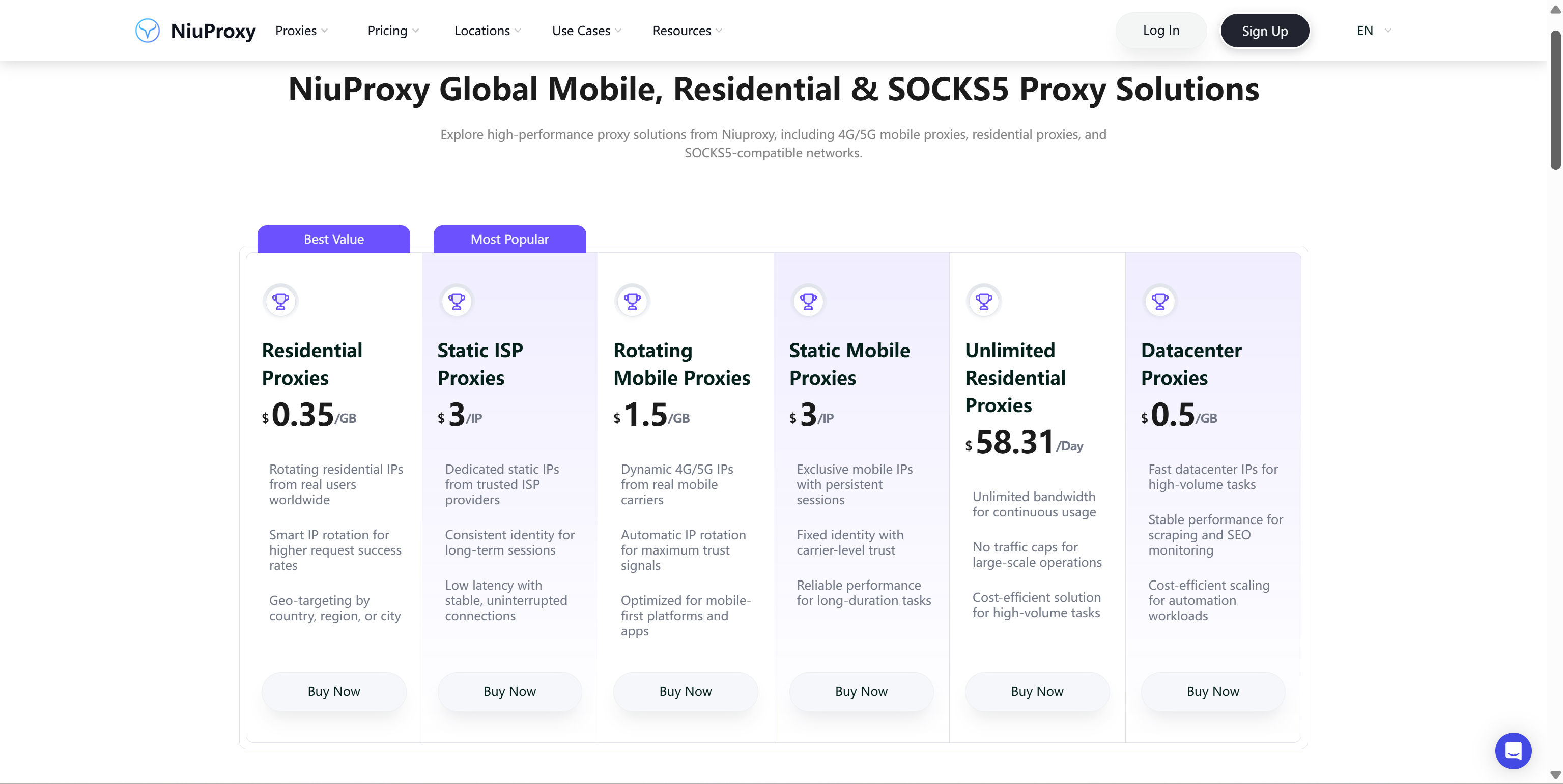
Key advantages include:
NiuProxy offers three rotating residential plans: Promax, Pro, and Mini.
Depending on the plan, users can benefit from:
This flexibility allows businesses to choose a plan based on how much traffic they need, how long they expect to use it, and whether geographic targeting is important to their workflows.
NiuProxy’s rotating residential Pro and Mini plans offer the following reference prices:
Prices are based on the listed package rates. Availability, plan conditions, and current pricing should be verified on the official NiuProxy website.
For businesses handling large volumes of residential proxy traffic, the 10 TB packages at $0.35/GB can help reduce the unit cost of ongoing data collection.
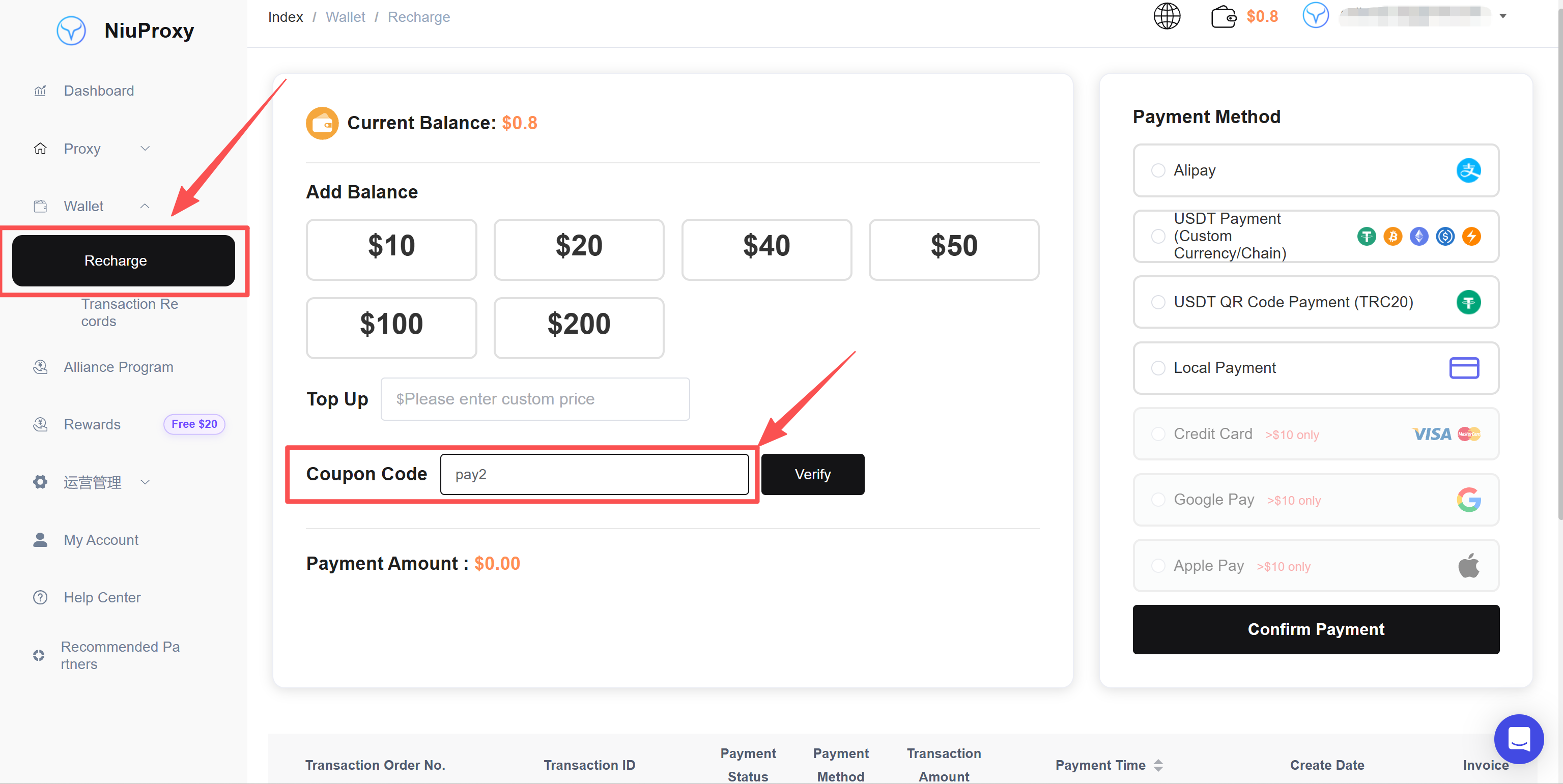
NiuProxy also offers a recharge promotion: use coupon code PAY2 for 10% off eligible recharges, subject to the current promotion terms.
Some tasks benefit from maintaining the same IP over a defined period, such as long-running sessions, e-commerce operations, advertising management, and website testing.
NiuProxy offers static ISP proxies in Broadcast and Premium Native options, with 7-day and 30-day packages.
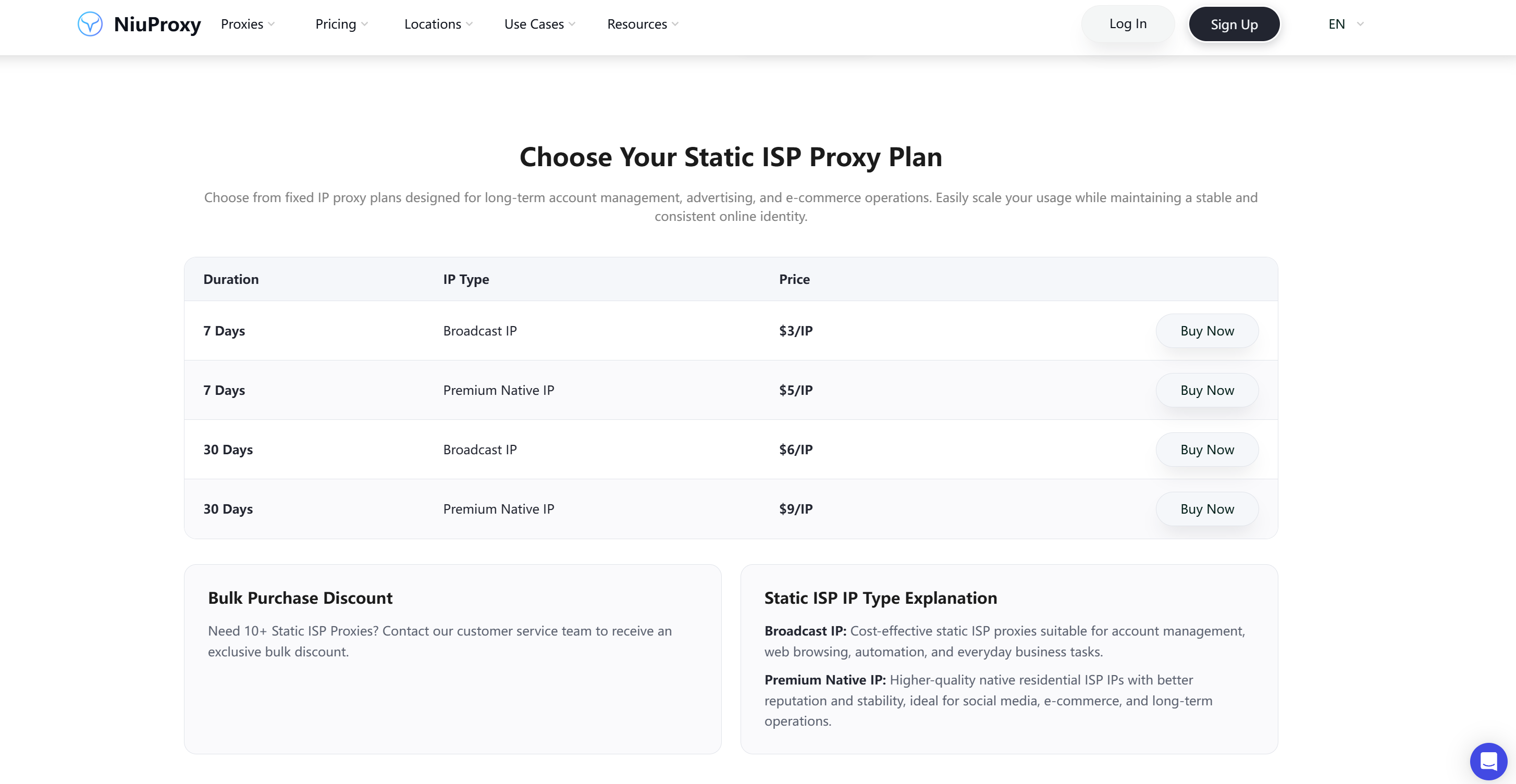
These proxies are worth considering when a workflow requires a consistent network endpoint rather than frequent IP changes.
The distinction is straightforward:
For example, an e-commerce team might organize profiles by store or project, while a marketing agency might structure them around clients or campaigns.
Use clear profile names and maintain consistent internal documentation so team members can identify the correct environment.
Open the relevant proxy configuration settings in ixBrowser and enter the supplied connection information.
After saving the configuration, run a connection test. Confirm that the proxy connects successfully and that the observed IP address and geographic location match your expectations.
Keep your proxy credentials private and avoid sharing authentication details in public documents or team channels without appropriate access controls.
Whether the browser profile opens and operates correctly.
Whether the proxy connection is stable.
Whether the observed IP address and location are correct.
Whether profile data and cookies remain separated as intended.
Whether page-loading performance meets your requirements.
Whether actual traffic consumption aligns with your budget.
For data collection projects, test with a small workload first. Increase the scale only after validating connection quality, resource consumption, and compliance with the target website’s requirements.
ixBrowser can help organize browser profiles for separate stores and projects, while NiuProxy offers residential and static ISP proxies for suitable regional research and business workflows.
This combination can make it easier to organize tasks across markets without relying on a single browser environment for everything.
Separate browser profiles can help keep project environments organized, while proxies can provide network connections suited to the relevant geographic requirements.
Teams should still follow each platform’s account, automation, and access policies. Using a proxy does not guarantee that an account will avoid restrictions.
NiuProxy’s global proxy coverage and geographic targeting options can support regional research and SEO monitoring. ixBrowser can complement these activities by providing separate browser profiles for different projects.
For repeatable research, teams should also document their target locations, test conditions, and data collection methods.
NiuProxy's rotating residential proxies can be evaluated for these requirements, while ixBrowser can support browser-based research and profile organization.
Not every scraping task requires an antidetect browser. For large-scale automated collection, a dedicated scraping framework or API may be more efficient. Choose the tools according to the target website, data access method, and project requirements.
Do you need rotating or static IPs?
Choose rotating residential proxies when IP rotation is useful for your workflow. Consider static ISP proxies when you need a consistent IP over a defined period.
Do you need location targeting?
If your project requires specific countries or cities, verify that your selected plan supports the required targeting level.
How much traffic will you use?
Smaller packages can be a practical starting point for testing. For sustained, high-volume workloads, compare the unit prices of larger packages.
How long do your sessions need to last?
Evaluate rotating and sticky-session options based on the technical requirements of your application.
What performance does your workflow require?
Test connection stability, latency, throughput, and actual task completion time. A low price per gigabyte is valuable, but overall suitability depends on the complete workflow.
Starting with a small test and scaling gradually can help you select the right plan without committing to unnecessary traffic.
ixBrowser helps users manage separate browser profiles, customize digital fingerprints, organize cookies, and collaborate with team members.
NiuProxy complements these capabilities with proxy solutions covering 190+ countries and regions, including rotating residential proxies starting at $0.35/GB on eligible 10 TB plans, static ISP proxies, and mobile proxies.
Whether you’re conducting SEO research, managing e-commerce operations, reviewing localized content, or collecting public web data, choosing the right combination of browser and proxy tools can make your workflow more flexible and manageable.
Ready to explore your options?
Website: https://niuproxy.com/ Support: support@niuproxy.com
Use browser and proxy tools responsibly and in accordance with applicable laws and the terms of the platforms you access.
An antidetect browser and a proxy service address different parts of this challenge. An antidetect browser helps organize separate browser profiles, while proxies provide flexible network connections with different IP addresses and geographic locations.
When used together appropriately, these tools can support more efficient workflows for account management, regional testing, and online research.
In this guide, we explore how ixBrowser and NiuProxy can complement each other, which proxy types to consider, and how to choose a solution that fits your business requirements.
1. Why Combine an Antidetect Browser with a Proxy Service?
Managing multiple accounts through a standard browser can become difficult as projects grow. Browser cookies, session data, browser fingerprints, and network configurations may overlap in ways that complicate account management.An antidetect browser and a proxy service help address different aspects of this problem.
Antidetect Browsers for Browser Profile Management
ixBrowser is an antidetect browser designed for multi-account management. It allows users to create separate browser profiles and provides features such as customizable digital fingerprints, cookie management, cloud storage, team collaboration, and batch operations.Instead of managing every account in the same browser environment, users can organize accounts into separate profiles with their own browsing data and configurations.
For businesses managing multiple projects or working in teams, these capabilities can simplify routine operations and make browser environments easier to organize.
Proxies for Flexible Network Connections
While browser profiles help organize browsing environments, proxies determine how requests connect to websites.For example, an e-commerce team may need to inspect product pages across different markets. An SEO professional may need to compare search results by location, while a research team may collect publicly available information from multiple sources.
A suitable proxy service provides additional flexibility in choosing IP types, geographic locations, and session behavior.
It is important to understand that neither an antidetect browser nor a proxy guarantees account security or prevents every form of detection. Results depend on the browser configuration, network quality, account behavior, and the policies of the platforms being accessed.
2. Meet NiuProxy: Flexible Proxy Solutions for Global Operations
NiuProxy provides proxy solutions for web scraping, SEO monitoring, e-commerce research, market intelligence, browser automation, AI data collection, and other online business applications.Its network covers more than 190 countries and regions, with multiple proxy types available for different technical requirements.
Key advantages include:
- Global coverage: Access proxy resources across 190+ countries and regions.
- Large residential IP pools: Different rotating residential plans offer IP pools ranging from 50 million to more than 80 million.
- Flexible targeting: Country-level and, on selected plans, city-level targeting.
- Multiple protocols: HTTP(S) and SOCKS5 support.
- Session flexibility: Rotating IPs and sticky sessions for different workflows.
- Scalable pricing: Traffic plans for small projects and large-scale data collection.
- Multiple proxy types: Residential, static ISP, mobile, and other proxy solutions.
Rotating Residential Proxies: Ideal for Flexible IP Rotation
Residential proxies route traffic through IP addresses associated with residential networks. They can be useful for legitimate web research, regional content checks, SEO monitoring, and public data collection.NiuProxy offers three rotating residential plans: Promax, Pro, and Mini.
Depending on the plan, users can benefit from:
- Residential IP pools of approximately 50M–80M+.
- Country and city-level targeting on eligible plans.
- HTTP(S) and SOCKS5 connectivity.
- Rotating IPs and sticky-session options.
- Different traffic packages for different project sizes.
This flexibility allows businesses to choose a plan based on how much traffic they need, how long they expect to use it, and whether geographic targeting is important to their workflows.
Affordable Pricing for Large-Scale Projects
Proxy traffic costs can become a significant operational expense when data collection runs continuously or across multiple markets.NiuProxy’s rotating residential Pro and Mini plans offer the following reference prices:
| Traffic package | Pro | Mini |
| 1 GB | — | $1.20/GB |
| 10 GB | $0.90/GB | — |
| 20 GB | — | $1.00/GB |
| 100 GB | $0.70/GB | $0.90/GB |
| 500 GB | — | $0.70/GB |
| 1,000 GB | $0.50/GB | $0.50/GB |
| 10,000 GB | $0.35/GB | $0.35/GB |
For businesses handling large volumes of residential proxy traffic, the 10 TB packages at $0.35/GB can help reduce the unit cost of ongoing data collection.
NiuProxy also offers a recharge promotion: use coupon code PAY2 for 10% off eligible recharges, subject to the current promotion terms.
Static ISP Proxies: When a Consistent IP Matters
Not every workflow requires frequently rotating IP addresses.Some tasks benefit from maintaining the same IP over a defined period, such as long-running sessions, e-commerce operations, advertising management, and website testing.
NiuProxy offers static ISP proxies in Broadcast and Premium Native options, with 7-day and 30-day packages.
These proxies are worth considering when a workflow requires a consistent network endpoint rather than frequent IP changes.
The distinction is straightforward:
- Rotating residential proxies are suitable for tasks that benefit from IP rotation and geographic flexibility.
- Static ISP proxies are suitable for workflows that need a consistent IP over a specified period.
3. How to Use NiuProxy with ixBrowser
Combining ixBrowser’s profile management capabilities with NiuProxy's proxy infrastructure can help create a more organized workflow for legitimate multi-account operations and regional research.Step 1: Create Separate Browser Profiles
Start by creating individual browser profiles in ixBrowser for the accounts or projects you are authorized to manage.For example, an e-commerce team might organize profiles by store or project, while a marketing agency might structure them around clients or campaigns.
Use clear profile names and maintain consistent internal documentation so team members can identify the correct environment.
Step 2: Choose a Proxy Based on Your Requirements
Determine the network requirements of each workflow before selecting a proxy.- For public web research, SEO monitoring, and regional content checks, evaluate rotating residential proxies.
- For workflows requiring a consistent IP over time, consider static ISP proxies.
- For tasks that specifically require mobile network connections, explore mobile proxy options.
Step 3: Configure the Proxy in ixBrowser
Obtain the proxy connection details from your NiuProxy account. Depending on your selected plan, these may include the protocol, server address, port, username, and password.Open the relevant proxy configuration settings in ixBrowser and enter the supplied connection information.
After saving the configuration, run a connection test. Confirm that the proxy connects successfully and that the observed IP address and geographic location match your expectations.
Keep your proxy credentials private and avoid sharing authentication details in public documents or team channels without appropriate access controls.
Step 4: Test Before Scaling Up
Before using the configuration in a larger workflow, check:Whether the browser profile opens and operates correctly.
Whether the proxy connection is stable.
Whether the observed IP address and location are correct.
Whether profile data and cookies remain separated as intended.
Whether page-loading performance meets your requirements.
Whether actual traffic consumption aligns with your budget.
For data collection projects, test with a small workload first. Increase the scale only after validating connection quality, resource consumption, and compliance with the target website’s requirements.
4. Practical Use Cases for ixBrowser and NiuProxy
Cross-Border E-Commerce
E-commerce businesses often need to research products, compare prices, review localized pages, and manage different operational environments.ixBrowser can help organize browser profiles for separate stores and projects, while NiuProxy offers residential and static ISP proxies for suitable regional research and business workflows.
This combination can make it easier to organize tasks across markets without relying on a single browser environment for everything.
Social Media and Digital Marketing
Marketing teams may manage multiple authorized accounts, campaigns, and client projects.Separate browser profiles can help keep project environments organized, while proxies can provide network connections suited to the relevant geographic requirements.
Teams should still follow each platform’s account, automation, and access policies. Using a proxy does not guarantee that an account will avoid restrictions.
SEO Monitoring and Market Research
Search results, localized content, and online product information can vary by market.NiuProxy’s global proxy coverage and geographic targeting options can support regional research and SEO monitoring. ixBrowser can complement these activities by providing separate browser profiles for different projects.
For repeatable research, teams should also document their target locations, test conditions, and data collection methods.
Web Scraping and Data Collection
Organizations collecting publicly available web data may need flexible IP rotation, geographic targeting, and scalable traffic plans.NiuProxy's rotating residential proxies can be evaluated for these requirements, while ixBrowser can support browser-based research and profile organization.
Not every scraping task requires an antidetect browser. For large-scale automated collection, a dedicated scraping framework or API may be more efficient. Choose the tools according to the target website, data access method, and project requirements.
5. How to Choose the Right Proxy Plan
Before purchasing a proxy plan, consider these five questions.Do you need rotating or static IPs?
Choose rotating residential proxies when IP rotation is useful for your workflow. Consider static ISP proxies when you need a consistent IP over a defined period.
Do you need location targeting?
If your project requires specific countries or cities, verify that your selected plan supports the required targeting level.
How much traffic will you use?
Smaller packages can be a practical starting point for testing. For sustained, high-volume workloads, compare the unit prices of larger packages.
How long do your sessions need to last?
Evaluate rotating and sticky-session options based on the technical requirements of your application.
What performance does your workflow require?
Test connection stability, latency, throughput, and actual task completion time. A low price per gigabyte is valuable, but overall suitability depends on the complete workflow.
Starting with a small test and scaling gradually can help you select the right plan without committing to unnecessary traffic.
6. Build a More Flexible Workflow with ixBrowser and NiuProxy
Effective multi-account management involves more than changing an IP address. It requires an appropriate browser environment, suitable network connections, clear operational procedures, and an understanding of platform requirements.ixBrowser helps users manage separate browser profiles, customize digital fingerprints, organize cookies, and collaborate with team members.
NiuProxy complements these capabilities with proxy solutions covering 190+ countries and regions, including rotating residential proxies starting at $0.35/GB on eligible 10 TB plans, static ISP proxies, and mobile proxies.
Whether you’re conducting SEO research, managing e-commerce operations, reviewing localized content, or collecting public web data, choosing the right combination of browser and proxy tools can make your workflow more flexible and manageable.
Ready to explore your options?
- Visit ixBrowser to learn more about browser profile management.
- Visit NiuProxy to compare proxy types and traffic plans.
- Use the code PAY2 at NiuProxy for 10% off eligible recharges, subject to the current promotion terms.
Website: https://niuproxy.com/ Support: support@niuproxy.com
Use browser and proxy tools responsibly and in accordance with applicable laws and the terms of the platforms you access.